
A free e-reader for Manga fans
Manga Reader is a free manga e-reader for those who like to read Manga, a form of comics or graphic novels that originated in Japan. The application has been created by an independent developer and serves two essential purposes. It can be used as a manga reader or as manga management software. With its help, you can read the comics stored on your computer or from online sources.
Top Recommended Alternative

Once you complete the Manga Reader download, you will be able to use the app’s several tools and functions to make Manga reading seamless. It is lightweight and fast, ensuring that your comics load at lightning-fast speed and don’t get stuck. Compared with other alternatives like MangaMeeya, ComicRack, and Calibre, Manga Reader has a very user-friendly interface.
What is the purpose of the Manga Reader app?
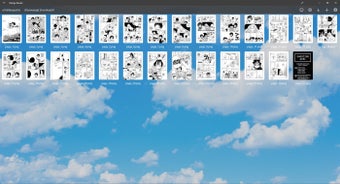
Manga Reader is an offline e-reader that allows you to read all the manga comics stored on your Windows computer or tablet. It provides two viewing options - a single page or all pages. You can also use the tool to skip chapters, flip through the comics and bookmark your location. Additionally, the Manga Reader software also offers web browser support, which means you can read manga online and download pages directly to your computer.
Does Manga Reader have a good interface?
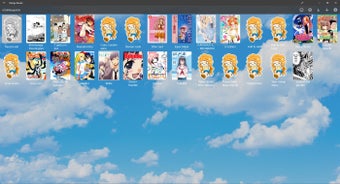
One of the best things about downloading Manga Reader is that it has a straightforward dashboard. The UI is minimalistic and clean, which ensures that you can read more since you won’t have to face too many distractions on the screen. Furthermore, the application uses a dark theme, a feature appreciated by a lot of users that have downloaded Manga Reader.
Can you use Manga Reader to read locally-stored manga?
With Manga Reader, you can read the manga that you have stored on your device. To start, all you will have to do is import the manga you wish to read and manage it using the Manga Reader app. Furthermore, you can use the tool for managing the locally stored comics.
For easier management, you can import all the locally stored manga on the platform. Once that’s done, you will be able to sort through the comics in any which way you want. You can even create folders for each file and place a cover image for better access. Additionally, all these folders appear in a grid so you can scroll through your e-books easily.
Does the Manga Reader app have any additional features?
With the help of Manga Reader, you can keep track of all your comics stored on your Windows device. Once you get started, you will be able to flip through the pages to read your favorite chapters. The entire reading experience is quite plain and simple without any distractions. For reading ease, the software also works in both horizontal and vertical modes.
Additionally, you can use the software to read manga available online. To help keep readers updated, the software also offers push notifications that will show up whenever a new chapter of a Manga is available. Once you import all your manga files on the application, you can easily access them without much effort. It also provides tips to help users with difficult words and new information.
Does Manage Reader work offline?
As mentioned above, the Manga Reader application works well for reading online and offline. In case you wish to use your web browser to download and read a manga comic, all the features of the app will remain the same. Once you download a manga and save it on your PC, you can use the Manga Reader app to go through the pages.
Does Manga Reader have any drawbacks?
The application is also quite lightweight and doesn’t lag. However, there is one drawback to the tool. After reading constantly for many hours, you may find that the application slows down.
Should I download Manga Reader?
If you like collecting and reading manga comics, and also are looking for an e-reader application, there’s no better option than Manga Reader. It’s an easy-to-use, minimalistic tool that makes reading quite fun. It has all the necessary features required in such an app, including push notifications for the latest releases and a guide. The software is available for free and won’t take up too many resources on your Windows PC. Furthermore, Manga Reader works offline, as well as online, ensuring that you don’t need another tool for all your reading needs.